
If your WordPress site is hacked, the next 24 hours matter more than the next 24 days. What you do first decides how much data you lose, how long you stay blacklisted and whether the attacker gets back in next week. Take a breath. This is fixable, and thousands of site owners deal with it every day.
Here is the order we work in when a client calls us with a hacked site.
How to tell if your site is really hacked
Not every problem is a hack. A bad plugin update can also break a site. These are the signs that point to a real compromise:
- Visitors are redirected to gambling, pharmacy or adult sites, often only on mobile or only from Google
- Google shows “This site may be hacked” or a red “Deceptive site ahead” warning
- Admin users you did not create
- Pages, posts or links you did not add, often in another language
- Your host has suspended the account for malware or spam
- Unknown PHP files in
wp-content/uploadsor the site root - Sudden spikes in server load or outgoing email
Two or more of these, and you should treat the site as hacked.
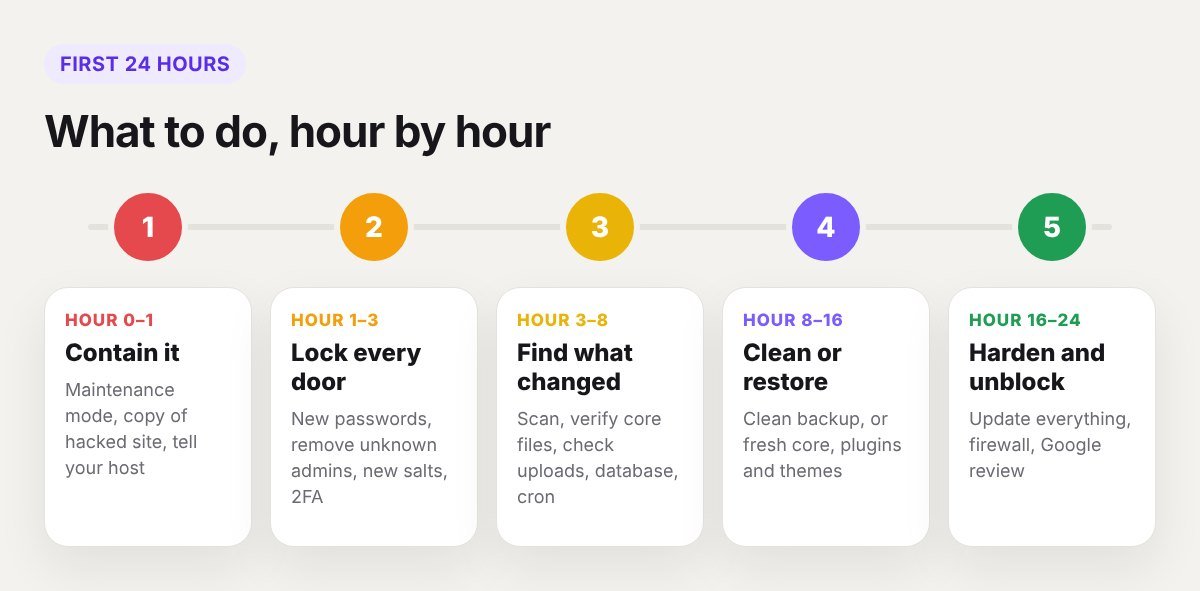
Hour 0 to 1: contain it
Do not delete anything yet. Deleting files in a panic removes the evidence that shows how the attacker got in.
- Put the site in maintenance mode or ask your host to restrict access. This protects visitors and stops further damage.
- Take a full copy of the files and database in their hacked state, and store it off the server. You may need it to recover content or to find the entry point.
- Tell your host. They often have malware logs and server-level scans, and they need to know before they suspend you.
- Write down what you saw and when. Times matter when you read the logs later.
Hour 1 to 3: lock every door
Assume every password is known. Change all of them, from a clean computer:
- Hosting control panel
- FTP and SFTP accounts
- Database user password, then update it in
wp-config.php - Every WordPress administrator
- The email accounts linked to those logins
Then:
- Delete admin users you do not recognise.
- Replace the security keys and salts in
wp-config.php. This logs out every session, including the attacker’s. - Turn on two-factor authentication for all admins.
- Scan your own computer for malware. Stolen passwords often come from an infected laptop, not from the website.
Hour 3 to 8: find out what was changed
Now look for the damage.
- Run a scanner. Wordfence and Sucuri SiteCheck are the usual starting points. Scanners miss things, so use them as a guide, not as proof the site is clean.
- Compare core files. With WP-CLI,
wp core verify-checksumslists WordPress files that differ from the official release. - Check recently changed files. Sort by modified date over FTP, or ask your host for a list.
- Look in the usual hiding places: PHP files inside
wp-content/uploads, extra code at the top ofwp-config.phpandindex.php, strange rules in.htaccess, and unknown folders inwp-content/mu-plugins. - Check the database: unfamiliar users, injected scripts in posts, and odd entries in the options table.
- Check scheduled tasks, both WordPress cron events and server cron jobs. Attackers use them to reinfect a cleaned site.
Hour 8 to 16: clean or restore
You have two routes.
Restore a clean backup
If you have a backup from before the infection, this is the fastest fix. Be sure of the date, because malware often sits quietly for weeks before it shows. After restoring, change all passwords again and update everything straight away. The hole the attacker used is still in that backup.
Clean the site by hand
If there is no safe backup:
- Replace the WordPress core files with a fresh download of the same version.
- Delete every plugin and theme, then reinstall each one from its official source. Do not copy the old folders back.
- Remove unknown files, especially PHP files in the uploads folder.
- Clean injected code from the database.
- Remove unknown cron jobs and admin users.
- Scan again, and repeat until the results are clean.
Never reinstall “nulled” or pirated plugins and themes. They are one of the most common sources of infection, and there is no safe version of one.
Hour 16 to 24: update, harden and get unblocked
- Update everything: WordPress, every plugin, every theme and PHP.
- Delete what you do not use. Inactive plugins and old themes are still attack surface.
- Check file permissions. Folders are normally 755 and files 644.
- Disable file editing in the dashboard by adding
define( 'DISALLOW_FILE_EDIT', true );towp-config.php. - Add a firewall, either through your host, Cloudflare or a security plugin.
- Request a review. If Google flagged the site, open Search Console, go to Security Issues and request a review once the site is clean. If your host suspended the account, ask them to rescan.
- Check blacklists. Sucuri SiteCheck shows whether security vendors are still flagging the domain.
- Tell your users if data was exposed. If customer accounts or orders were on the site, ask them to change their passwords. Depending on where you operate, you may also have a legal duty to report a breach, so check with someone qualified.
Find out how they got in
A cleaned site with the same weakness gets hacked again, often within days. The usual causes are:

- An outdated plugin or theme with a known vulnerability
- A weak or reused admin password
- A nulled plugin or theme
- An infected computer that leaked FTP or admin logins
- Another hacked site on the same hosting account
Server access logs for the hours before the first change usually show the entry point. If you cannot find it, treat all five as possible and fix each one.
What not to do
- Do not ignore it and hope it goes away. Blacklisting gets worse with time.
- Do not only delete the one file the scanner found. There is almost always more than one backdoor.
- Do not restore a backup and stop there.
- Do not pay anyone who contacts you out of nowhere claiming they can “unlock” your site.
- Do not keep working from the same passwords.
How to stop it happening again
- Keep automatic updates on for minor releases and security patches.
- Use few plugins, and choose ones that are actively maintained. A builder that includes forms, popups and sliders removes several plugins at once.
- Use unique passwords and two-factor authentication.
- Keep daily off-site backups and test a restore once in a while.
- Give each person their own login with the lowest role they need.
- Use hosting that isolates sites from each other.
Frequently asked questions
How long does it take to clean a hacked WordPress site?
A simple infection can be cleaned in a few hours. A site with database injections and several backdoors can take one to two days. Google’s review of a flagged site usually adds a few days more.
Will a hack hurt my Google rankings?
It can while the site is flagged or serving spam. If you clean it quickly and request a review, rankings normally recover. Spam pages left in the index for weeks do longer-lasting damage.
Is a security plugin enough to prevent hacks?
No. It helps, but updates, strong passwords and good hosting do most of the work.
Can I clean a hacked site myself?
If you are comfortable with FTP, the database and reading PHP, yes. If the site takes payments or holds customer data, get help. A missed backdoor costs more than the clean-up.
Need it fixed today?
We remove malware from WordPress sites, close the hole and help you get off blacklists. Our build studio WPBuilderPros handles clean-ups and ongoing care. Send us your URL and tell us what you are seeing, and we will reply with next steps.