
Every freelancer knows the message. The site launched on Friday, and on Monday the client writes: “I only changed the phone number and now the homepage looks broken.” It is rarely the client’s fault. They were handed a powerful builder with no guard rails. This guide covers how to hand over a Breakdance site so clients can update what they need and nothing else.
Decide what the client actually needs to edit
Before you touch any settings, ask the client one question: what will you change in the next six months? The answers are nearly always the same:
- Blog posts and news
- Phone number, address and opening hours
- Prices, staff, services or menu items
- Photos on a few pages
- Occasional text changes
Almost nobody needs to change layouts, spacing or the header design. Build the handover around the real list, not around everything the builder can do.
Use Breakdance Client Mode
Breakdance has a built-in limited editing mode, called Client Mode in its documentation. A user with this access can change text and other content inside existing elements, but cannot add, delete or rearrange the design elements. The layout stays exactly as you built it.
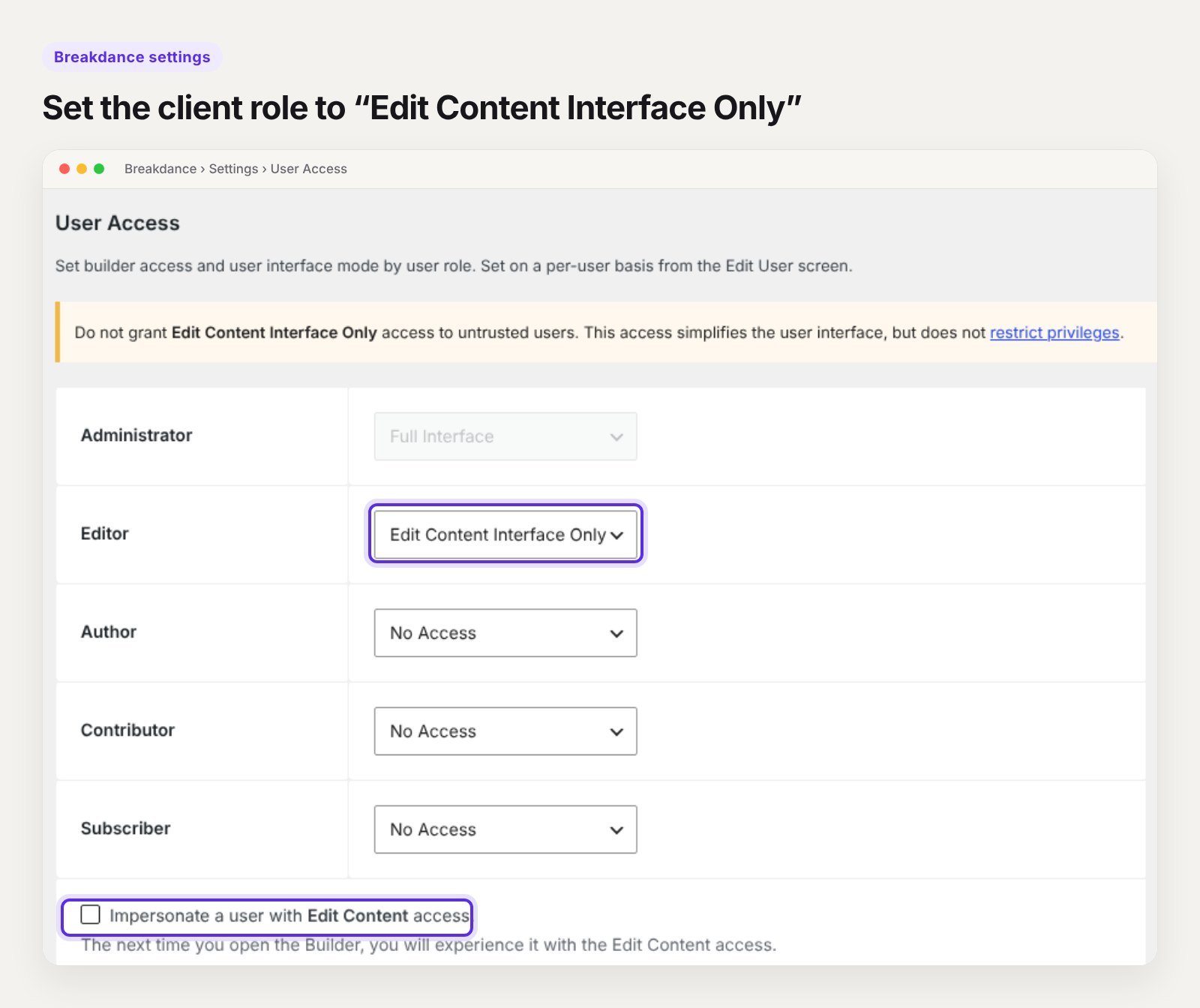
To set it up:
- Go to Breakdance > Settings > User Access.
- Set the client’s role to Edit Content Interface Only instead of Full Interface. Administrators have full access by default and other roles have none.
- Tick Impersonate a user with Edit Content access on the same screen, save, and open the builder to see it exactly as the client will.
One important detail from Breakdance’s own documentation: the limited interface simplifies what the client sees, but it does not restrict their WordPress privileges. Only give it to people you trust, and still give them the lowest WordPress role that does the job.
Give the client the right WordPress role
Clients rarely need to be administrators. Being an administrator means they can install plugins, change themes and delete users, which is how most “I broke it” emails start.
| Role | Good for | Can install plugins |
|---|---|---|
| Administrator | You, the developer | Yes |
| Editor | A client who manages pages and blog posts | No |
| Author | Someone who only writes their own blog posts | No |
Make the client an Editor with Breakdance edit-content access. Keep the administrator account for yourself, or give them a separate admin login with a clear note that it is for emergencies only.
Build the site so it is hard to break
Settings help, but how you build matters just as much.
Put repeated content in one place
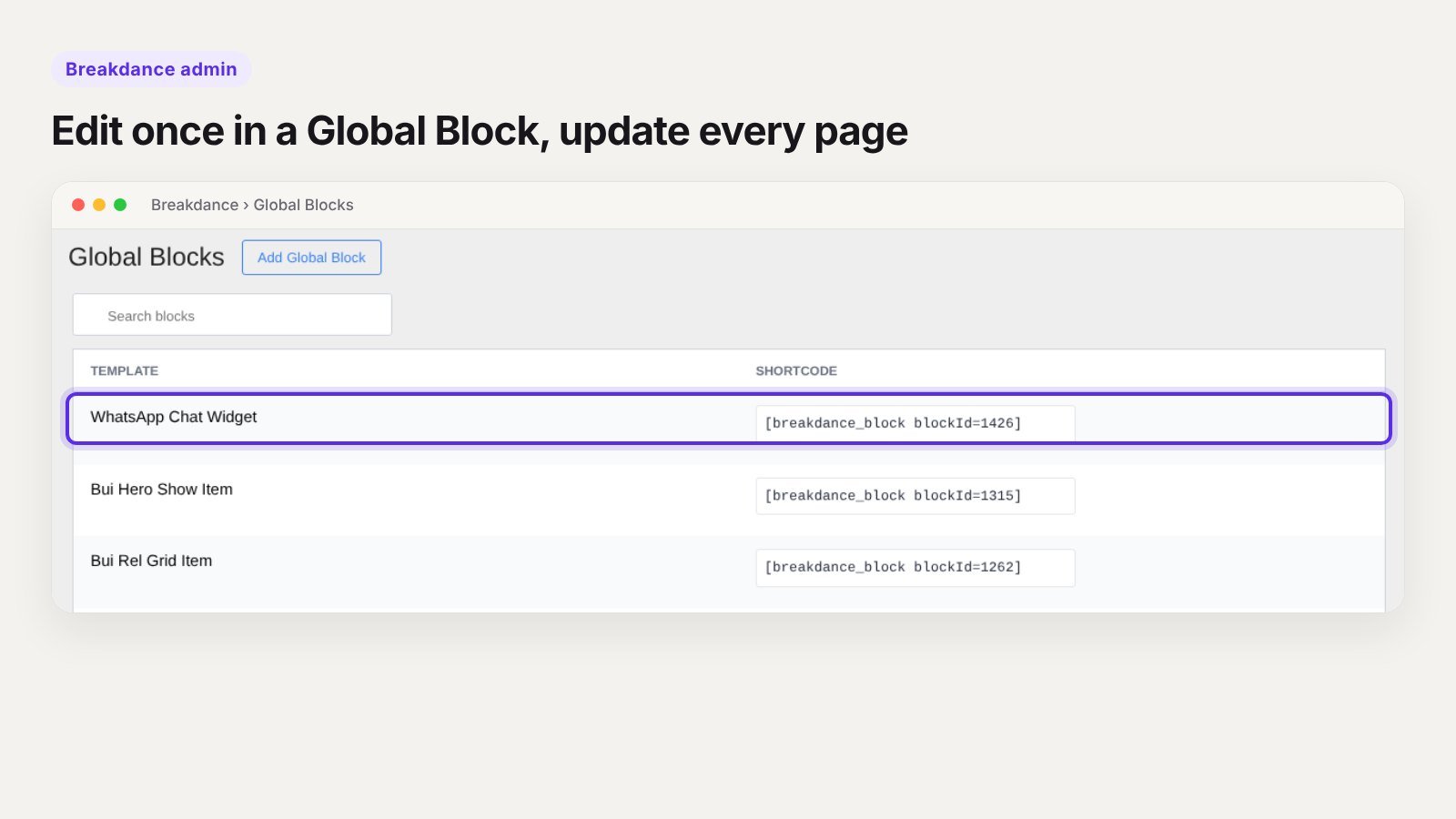
If the phone number appears in the header, footer and contact page, it should be edited in one place. Use a Global Block for the footer and any repeated section, so a single change updates every page. The WhatsApp chat button on this site is a Global Block for exactly this reason.
Use global styles, not one-off styling
Set colours and fonts in Breakdance’s global settings and use classes. If a client pastes text into a heading, it picks up the right style automatically instead of whatever they copied from Word.
Use templates for anything with more than three entries
Team members, services, locations and portfolio items should be custom post types with a template, not hand-built pages. The client fills in a simple form with fields such as name, photo and description, and the template handles the design. Our guide to Breakdance dynamic templates shows how this works.
Keep blog posts in the WordPress editor
Clients who write blog posts should use the normal WordPress editor, with a Breakdance template around it. It is familiar, quick, and there is no layout to break.
Lock down the rest of WordPress
- Turn off theme and plugin editing by adding
define( 'DISALLOW_FILE_EDIT', true );towp-config.php. - Hide menus they do not need. An admin menu editor plugin can hide Breakdance settings, Tools and other screens from the client role.
- Remove unused plugins and themes before handover. Less to update, less to click.
- Set up automatic backups that run daily and are stored off the server.
- Turn on two-factor login for every account with editing rights.
Record a short walkthrough
A five-minute screen recording saves hours of support. Cover only the jobs on the client’s list:
- How to log in
- How to write and publish a blog post
- How to change text and swap an image on a page
- How to update the repeated details, such as phone number or opening hours
- Who to contact if something looks wrong
Send it with a one-page written guide. Most clients will watch the video once and keep the guide.
The handover checklist
- Client has an Editor account with Breakdance edit-content access
- Client mode tested with impersonation
- Repeated content lives in Global Blocks
- Global colours and fonts set, no one-off styling on key text
- Repeating content uses custom post types and templates
- File editing disabled in wp-config.php
- Unused plugins and themes removed
- Daily off-site backups running
- Two-factor login on all editing accounts
- Domain, hosting and licence logins handed over or documented
- Walkthrough video and one-page guide sent
- Support terms agreed in writing
Agree what happens after launch
Even a well-locked site needs updates. Before you hand over, agree in writing:
- Who updates WordPress, Breakdance and plugins, and how often
- What a care plan includes and costs
- How quickly you reply to problems
- What counts as a change request rather than a fix
Clear terms protect the relationship as much as the website.
Start from a structure that is already clean
Much of this handover work is easier when the site was built on a solid base. Our Breakdance templates use global styles, classes and a simple structure from the start, so the handover is mostly about permissions and training. If you build sites for clients often, the All-Access pass gives you every template for one payment.
Frequently asked questions
Can a client break a Breakdance site in Client Mode?
They cannot add, delete or move design elements, so the layout is protected. They can still change text and images, so a very long headline or a huge photo can still look wrong. Training covers the rest.
Should I give my client the administrator login?
They should own the site, so the details should be documented and handed over. For daily editing, an Editor account with limited Breakdance access is much safer.
How do clients edit blog posts in Breakdance?
Use the normal WordPress editor for the post content and a Breakdance template for the design around it. The client never has to open the builder to publish a post.
What is the easiest way to let clients change repeated details?
Put them in a Global Block, or store them as site-wide custom fields and show them with dynamic data. One edit then updates every page.
Need a site built for easy handover?
We build Breakdance sites that clients can actually manage, with permissions, templates and a walkthrough included. Tell us about your project or book a 30-minute call.