
A fast Breakdance site is not an accident. Breakdance gives you a lean starting point, but most Breakdance speed problems come from the same handful of things: oversized images, too many fonts, a slow host and third-party scripts nobody remembers adding. Here are the ten fixes we apply, in the order we apply them, to get a site to a 90+ PageSpeed score on mobile.
A quick word on the number first. PageSpeed Insights gives you a lab score out of 100, and separately shows real-user Core Web Vitals when your site has enough traffic. Google uses the real-user data, not the score. So treat 90+ as a useful target, and treat passing Core Web Vitals as the actual goal.
What PageSpeed actually measures
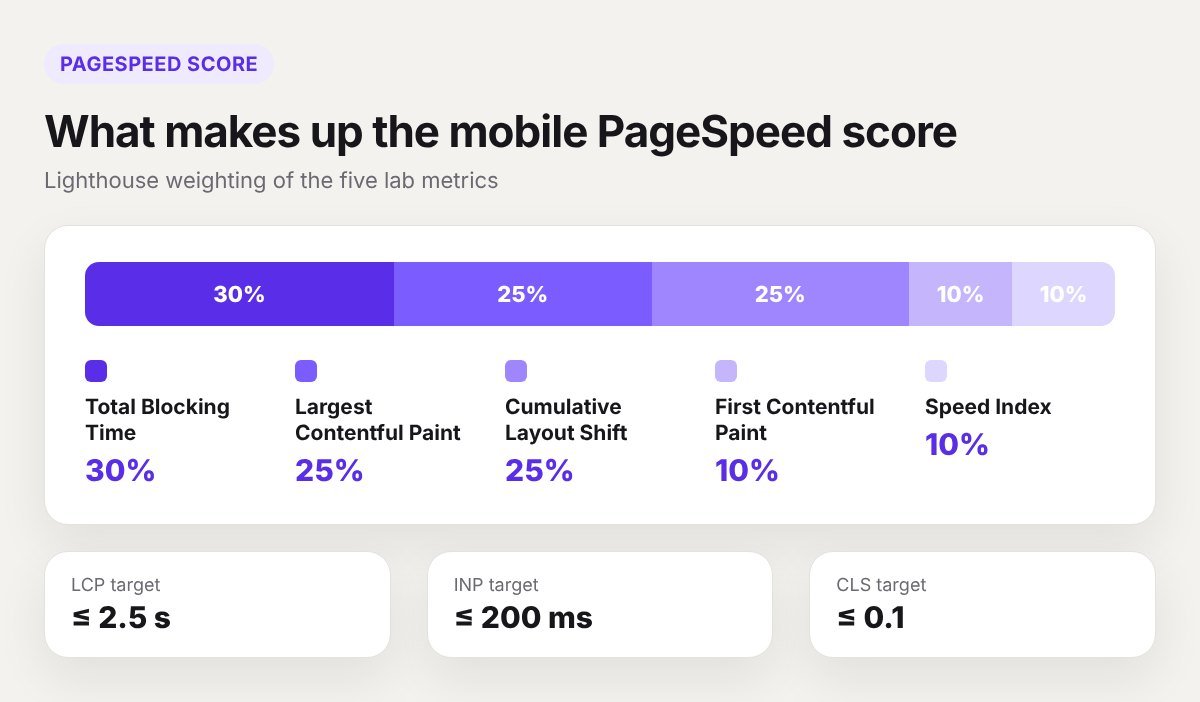
The mobile score is a weighted mix of five lab metrics. Total Blocking Time counts for 30%, Largest Contentful Paint and Cumulative Layout Shift for 25% each, and First Contentful Paint and Speed Index for 10% each. That tells you where to spend your time: JavaScript, the hero area and layout stability.
For Core Web Vitals, the targets are:
- LCP (Largest Contentful Paint): 2.5 seconds or less
- INP (Interaction to Next Paint): 200 milliseconds or less
- CLS (Cumulative Layout Shift): 0.1 or less
Always test the mobile tab. Desktop scores are easy and tell you very little.
1. Fix the server before you touch the page
No setting inside the builder can rescue a slow server. If the first byte takes more than a second to arrive, every other metric starts late. Check “Reduce initial server response time” in your PageSpeed report. If it is flagged:
- Turn on full-page caching, either from your host or a caching plugin.
- Use a current PHP version. PHP 8.2 or newer is noticeably faster than 7.4.
- Put a CDN in front of the site if your visitors are spread across countries.
- If it is still slow on a cached page, the hosting plan is the problem.
2. Turn on Breakdance’s performance settings
Go to Breakdance > Settings > Performance. This screen switches off WordPress features most sites never use. On a typical brochure site you can safely disable:
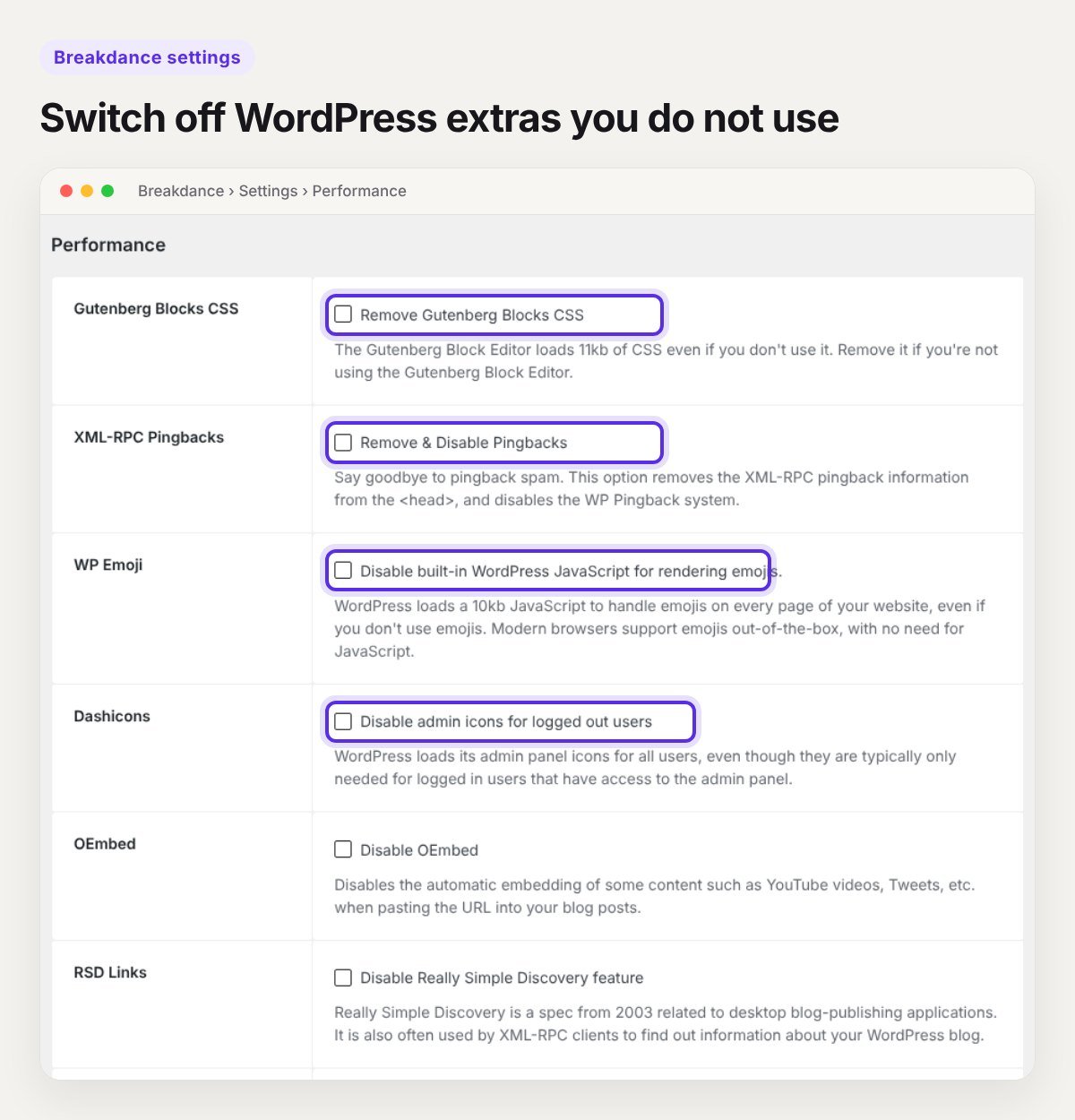
- Gutenberg Block CSS, if your pages are built in Breakdance and not the block editor
- WP Emoji
- Dashicons for logged-out visitors
- oEmbed, if you do not paste YouTube or X links into posts
- XML-RPC pingbacks, RSD links and WLW links
- The WP generator tag, shortlink and relational links
Keep Gutenberg Block CSS on if your blog posts are written in the block editor, or they will lose their styling. Change two or three settings at a time and check the site after each save.
3. Upload images at the size you display them
This is the biggest win on almost every slow site. A 4000 pixel photo in a 600 pixel column wastes most of the download.
- Resize before upload. Around 1600 pixels wide is enough for a full-width hero, 800 for half-width columns.
- Serve WebP or AVIF. Most hosts and image plugins convert on upload.
- Aim for under 150 KB for a hero image and under 60 KB for content images.
- In Breakdance, pick a sensible image size in the element settings instead of leaving everything on “full”.
Breakdance uses the srcset sizes from the WordPress media library, so phones get a smaller file automatically, as long as the original is not enormous.
4. Do not lazy load the hero image
Breakdance lazy loads images by default, which is right for everything below the fold. It is wrong for the first image a visitor sees. If your LCP element is the hero image and it is lazy loaded, the browser waits before it even starts the download.
Open the hero image element and switch lazy loading off for that one image. If you use a performance plugin, add the hero to its preload list as well. Avoid background images for the hero where you can. A real image element is discovered earlier by the browser.
5. Cut your fonts down
Every font weight is a separate file. A site with two families and five weights each loads ten files before text settles.
- Use one or two families.
- Load only the weights you use. Regular and bold cover most designs.
- Host fonts locally instead of calling Google Fonts on every page load.
- Make sure
font-display: swapis set so text shows straight away.
Fonts also cause layout shift when the fallback font is a different width. Fewer weights means fewer chances for that.
6. Use what Breakdance already has
Breakdance includes forms, popups, sliders, menus, galleries and WooCommerce elements. Each one only loads its CSS and JavaScript on pages where it is used. A separate plugin for the same job usually loads its files on every page.
Go through your plugin list and ask of each one: does Breakdance already do this? Slider plugins, popup plugins, icon packs and “addon” bundles are the usual suspects. Removing five plugins often does more than any optimisation setting.
7. Delay third-party scripts
Analytics, chat widgets, pixels, heatmaps and cookie banners are the main cause of a high Total Blocking Time. They are also the ones clients add without telling you.
- Remove any tag that nobody looks at any more.
- Delay the rest until the visitor scrolls, taps or moves the mouse. We use Perfmatters for this on our own site. WP Rocket and FlyingPress have the same feature.
- Load chat widgets on click, not on page load.
Test forms, cart and checkout after delaying scripts. Anything that must run immediately goes on the exclusion list.
8. Be careful with sliders, video and animation
A full-width slider with five large images in the hero is the slowest thing you can put on a page. Most visitors never see the second slide.
- Replace hero sliders with one strong image and one headline.
- Never autoplay a background video on mobile. Show a poster image instead.
- For YouTube embeds, load a thumbnail first and the player on click.
- Use entrance animations on a few elements, not on every section.
9. Keep the structure flat
Breakdance already writes less markup than most builders, but you can still bury content under wrapper after wrapper. A simple rule: if a container only exists to hold one other container, delete it.
Use global styles and reusable classes instead of styling every element one at a time. You get less CSS, a more consistent design, and a site that is easier to hand over. If you start from a BreakUI template, this structure is already in place.
10. Stop layout shift, then test again
CLS is a quarter of the score and the easiest part to fix.
- Give every image a width and height. Breakdance does this for media library images.
- Reserve space for embeds, ads and cookie banners.
- Do not inject banners above existing content after the page has loaded.
- Set a fixed header height so it does not jump when the logo loads.
Then test properly. Run PageSpeed Insights three times on mobile and take the middle result, because scores move by a few points between runs. Test the home page, one inner page and one blog post, since they often behave differently.
What a 90+ score will not do
A good score will not rank a page with thin content, and a score of 85 will not sink a useful one. Speed removes a reason for visitors to leave. It does not give them a reason to stay. If you want the wider picture, read our guide on whether Breakdance is good for SEO.
Frequently asked questions
Is Breakdance faster than Elementor?
Out of the box, usually yes. Breakdance loads only the assets a page uses and writes less HTML. In Breakdance’s own test, a blank page weighed 42 KB against 587 KB for Elementor. That is a vendor test, so treat it as a direction, not a guarantee. We compare the two in detail in Breakdance vs Elementor.
Do I need a caching plugin with Breakdance?
Yes, unless your host already does full-page caching. Breakdance caches its own CSS files, but it does not cache whole pages.
Why is my mobile score much lower than desktop?
The mobile test simulates a mid-range phone on a slow 4G connection. Heavy JavaScript and large images hurt far more under those conditions. This is normal, and it is why mobile is the score to work on.
Can a template be fast?
Yes, if it is built properly. Our templates use global styles, a flat structure and no extra plugins, so you start from a clean base instead of fixing one.
Want us to do it for you?
If your Breakdance or WordPress site is slow and you would rather not spend a weekend on it, send us the URL. We will tell you what is holding it back and what it takes to fix. Or book a 30-minute call and we can look at it together.